

AI automation for business uses intelligent software to execute rule-based processes automatically — connecting your existing tools into workflows that trigger, route, and act on data without human input at each step. Unlike simple scheduled tasks, AI-driven automation applies conditional logic and behavioral signals to make workflow decisions dynamically, scaling operational capacity without proportionally scaling headcount.
Most business owners have a working definition of automation — something that runs on its own. What's less understood is the specific architecture that separates intelligent automation from basic task scheduling, and why that difference determines whether an automation investment compounds in value or plateaus after solving a single workflow problem. This article explains what AI automation for business actually is, how the trigger-logic-action architecture works, and which process categories produce the fastest measurable returns when automated first.
For businesses evaluating a full AI automation services for business implementation, this foundational overview establishes the conceptual framework that informs every platform and workflow decision downstream.
What Makes Automation "AI-Driven" vs. Basic Scheduled Tasks
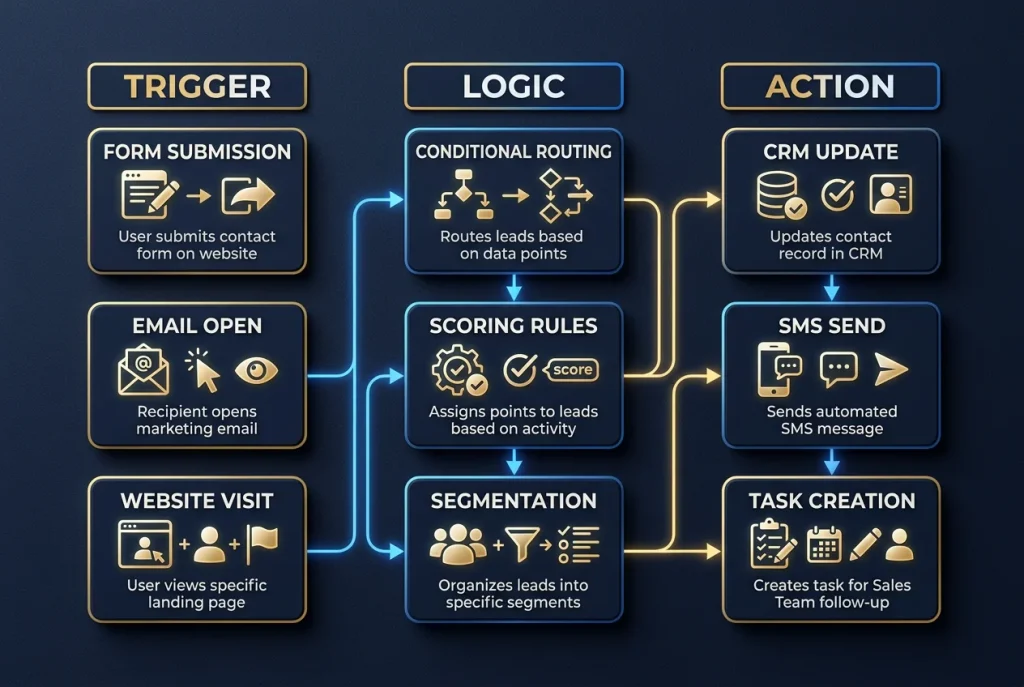
AI-driven automation differs from basic task scheduling through its use of conditional logic, behavioral triggers, and multi-system data integration. Where a scheduled task executes at a fixed time regardless of context, AI automation evaluates real-time conditions — lead score, engagement behavior, deal stage, customer sentiment — and routes workflow execution accordingly. This contextual decision-making is the architectural characteristic that enables one automation system to handle the complexity of an entire business process, not just a single recurring action.
The distinction matters practically because it determines the ceiling of what automation can solve. A scheduled email that fires every Monday morning regardless of whether the recipient opened last week's message, converted, or unsubscribed is a scheduled task — and a crude one. An AI-driven workflow that detects which recipients engaged, routes engaged contacts into an accelerated sequence and unengaged contacts into a re-engagement campaign, and suppresses contacts showing unsubscribe-intent signals is intelligent automation — and the performance difference between the two approaches compounds with every campaign cycle.
The core architecture of any AI automation workflow has three components:
Trigger: What Starts the Workflow
A trigger is any event that initiates automation execution. Triggers can be:
- Form submission — a lead fills out a contact form on your website
- Behavioral signal — a prospect opens an email, clicks a link, or visits a specific page
- CRM field change — a deal moves to a new pipeline stage or a contact score crosses a threshold
- Time condition — a defined period since last contact elapses with no engagement
- External data event — an API call from a connected platform signals that a condition has been met
Logic: How the Workflow Makes Decisions
Logic is the conditional layer that evaluates the trigger context and determines which path executes. This is where AI-driven automation diverges from rule-based scripting — instead of a single if-then response, logic layers apply weighted conditions, scoring thresholds, and multi-variable routing:
- Conditional branching — if lead score is above 70, route to sales rep notification; if below 40, route to nurture sequence; if 40–70, continue automated qualification
- Data transformation — extract specific fields from incoming data and format them for the destination system
- Error handling — if expected data is missing or a connected system returns an error, route to fallback path and alert the appropriate team member
Action: What the Workflow Executes
The action is the output — what the automation does after evaluating the trigger and logic:
- Create or update a CRM contact record
- Send a personalized email or SMS with dynamically populated fields
- Post an internal Slack notification to the relevant team member
- Create a task in your project management system
- Log data to a spreadsheet or reporting dashboard
- Book a calendar appointment based on available slots
| Automation Tier | Example Workflow | Trigger Type | Logic Complexity | Platforms Involved |
| Simple (Tier 1) | Form → CRM contact creation → welcome email | Single event | Single condition | Website + CRM + Email |
| Moderate (Tier 2) | Lead score change → route to rep or nurture based on score | Behavioral signal | Multi-conditional | CRM + Scoring + Email + Slack |
| Complex (Tier 3) | Proposal sent → multi-step follow-up sequence with reply detection + CRM updates | Multiple events | Dynamic routing with fallbacks | CRM + Email + Calendar + Project Mgmt |
| Enterprise | Cross-system data sync with custom API transformations + reporting automation | API events | Data transformation + error handling | Custom stack |
Which Business Processes Benefit Most from AI Automation
The processes with the highest AI automation ROI share a measurable profile: they're executed frequently (daily or multiple times weekly), they follow consistent rules that don't require human judgment on a case-by-case basis, they involve data moving between two or more systems, and errors in their execution carry quantifiable cost consequences — missed follow-up, incorrect records, delayed reports. Processes that meet all four criteria should be prioritized for automation regardless of industry.
The frequency factor is the most important ROI multiplier. An automation that saves 10 minutes per execution delivers 50 minutes of recovered time per week when the process runs five times daily — or 800+ hours per year at scale. McKinsey's analysis of automation potential across business functions identifies data collection and processing tasks as carrying 60–70% automation potential — among the highest of any work category. That time-savings calculation, multiplied by loaded labor cost, is the ROI numerator. Implementation cost is the denominator. Processes with high execution frequency reach payback periods of two to six weeks for Tier 1 workflows.
The categories that most consistently meet all four criteria across service businesses:
Lead and customer communication: Follow-up email and SMS sequences, appointment confirmations, re-engagement campaigns, and onboarding sequences are high-frequency, rule-based, multi-system, and error-costly — the ideal automation profile.
Data entry and record management: Any process that requires copying information from one system into another — form submissions to CRM, email replies to contact notes, invoice data to accounting records — is pure automation territory. These processes are frequent, completely rule-based, and carry error risk that compounds downstream.
Reporting and analytics distribution: Compiling data from Google Analytics, ad platforms, and CRM into formatted reports and distributing them to stakeholders on a weekly or monthly cadence eliminates 2–4 hours of administrative work per report cycle with zero output quality degradation.
Internal notifications and task creation: Alerting the right team member when a specific event occurs — a high-value lead submits a form, a client invoice goes past due, a project milestone is reached — and automatically creating the associated follow-up task removes an entire category of coordination overhead.
The starting point for any AI automation initiative is an honest inventory of where staff time actually goes. Processes that appear infrequent in isolation often prove high-frequency in aggregate — a task that takes three minutes but happens forty times per week consumes two hours of weekly capacity that automation recovers entirely.
How AI Automation Differs from Robotic Process Automation (RPA)
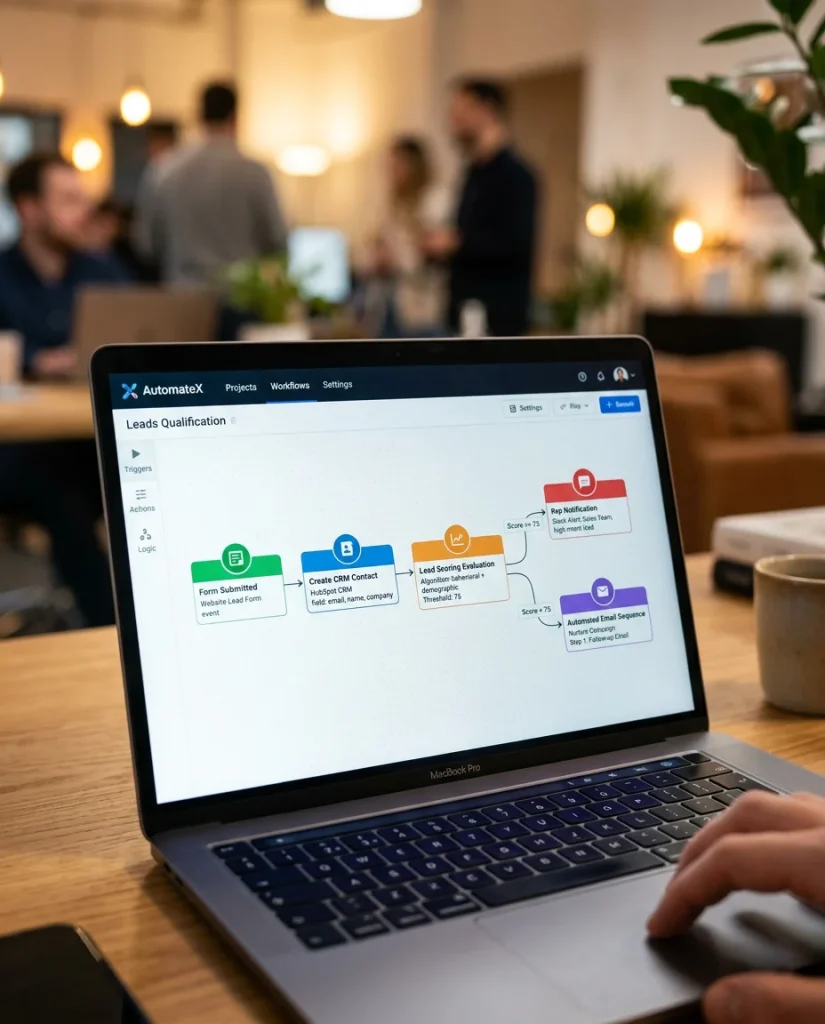
AI automation and robotic process automation (RPA) are architecturally distinct: RPA replicates human interface interactions by simulating mouse clicks, keystrokes, and screen navigation in legacy software systems that lack APIs. AI automation operates through direct system integrations via APIs and webhooks, applying conditional logic and behavioral intelligence that RPA cannot replicate. For businesses running modern cloud-based tools, AI automation consistently outperforms RPA on speed, reliability, and scalability.
The practical distinction matters most for businesses evaluating which approach to invest in. RPA emerged as a solution for legacy enterprise systems — mainframes, proprietary databases, older industry-specific platforms — that predate API architecture. If your core business software is modern and API-accessible, RPA adds implementation complexity and maintenance overhead without delivering the intelligence layer that AI automation provides natively.
The maintenance consideration alone often determines the choice: RPA workflows break whenever the software interface changes — button positions, menu structures, screen layouts — requiring manual remediation each time the underlying application updates. API-based AI automation is interface-agnostic; changes to how a platform looks don't affect integrations that communicate directly with the data layer.
For the majority of service businesses running CRM, email marketing, scheduling, and project management software built in the last decade, AI automation via platforms like Make and Zapier delivers faster implementation, more reliable operation, greater intelligence capability, and lower long-term maintenance cost than RPA alternatives.
Key Takeaways
- AI automation executes rule-based processes through trigger-logic-action architecture — triggers initiate workflows, logic applies conditional routing decisions, and actions produce outputs across connected systems without human intervention.
- The ROI multiplier is execution frequency: automating a 10-minute process that runs five times daily recovers 800+ hours annually at zero marginal cost per additional execution.
- Highest-priority automation targets share four characteristics: high execution frequency, consistent rule-based logic, multi-system data movement, and quantifiable cost consequences from errors or delays.
- AI automation outperforms RPA for modern cloud software: API-based integration is faster to implement, more reliable under software updates, and capable of behavioral intelligence that interface simulation cannot replicate.
- Tier 1 workflows reach payback in 2–6 weeks: simple automations (follow-up sequences, data capture, appointment reminders) deliver the fastest ROI and build organizational confidence for larger Tier 2 and Tier 3 investments.
- The automation audit determines ROI ceiling: identifying your highest-frequency, highest-cost manual processes before selecting platforms or building workflows ensures investment concentrates where returns are largest.
Conclusion
AI automation for business is the operational infrastructure that allows service businesses to grow revenue without proportionally growing the administrative overhead that typically constrains scale. The foundational architecture — triggers, logic, and actions operating across connected systems — is applicable to virtually every business function, and the ROI case for high-frequency process automation is clear and calculable before a single workflow is built.
The decision point isn't whether automation makes sense — for any service business processing more than 50 customer interactions monthly, it does. The decision is where to start for maximum immediate return and how to build an automation architecture that compounds in value as your business scales. Authority Solutions® AI automation services for business begin with a workflow audit that produces a ranked opportunity list with ROI projections — so the first automation investment targets the highest-return process, not the easiest one. Contact our team to schedule your audit.
Frequently Asked Questions
What is AI automation for business in simple terms?
AI automation for business uses software to execute repetitive, rule-based processes automatically — connecting your tools so that when one event occurs (a form submitted, an email opened, a deal stage changed), a predefined sequence of actions runs across your systems without anyone manually triggering or completing each step.
What's the simplest example of AI automation in a business context?
A lead submits a contact form → the automation creates a CRM contact record → sends a personalized confirmation email → assigns a follow-up task to the responsible sales rep → notifies the rep via Slack. This entire sequence executes in under 30 seconds, without any manual steps, every time a form is submitted — 24 hours a day.
Do I need technical skills to implement AI automation?
Tier 1 and Tier 2 workflows using platforms like Zapier and Make require no coding knowledge — their visual builders allow non-technical users to connect apps and build logic-based flows. Complex Tier 3 workflows involving custom API integrations or proprietary systems benefit from developer involvement or an experienced AI automation agency managing the architecture.
How does AI automation connect to tools I already use?
Automation platforms connect to your existing software through pre-built native integrations (Zapier connects to 6,000+ apps; Make to 1,800+) or custom API connections. Most modern business tools — CRMs, email platforms, scheduling software, project management systems — have APIs that allow automation platforms to read from and write to them directly.
What's the first process I should automate in my business?
Audit the five processes that consume the most staff time per week and follow consistent rules without requiring case-by-case human judgment. The process at the intersection of highest frequency, most consistent logic, and greatest error cost is your highest-ROI first automation. For most service businesses, lead follow-up sequences and appointment reminder workflows meet all three criteria simultaneously.